
Units, leases, rent and repairs for landlords and letting agents
Every building, unit and tenant in one place: leases with rent and deposits, rent invoiced for the whole portfolio in one click, arrears you can chase, and repairs you can track — with double-entry accounts kept for you, on your own server, for a one-time fee with no per-unit charges.
Built for
- Landlords with several flats, houses or shops
- Letting and property management agents
- Owners of apartment blocks, shopping parades and office buildings
- Anyone tracking rent in spreadsheets today
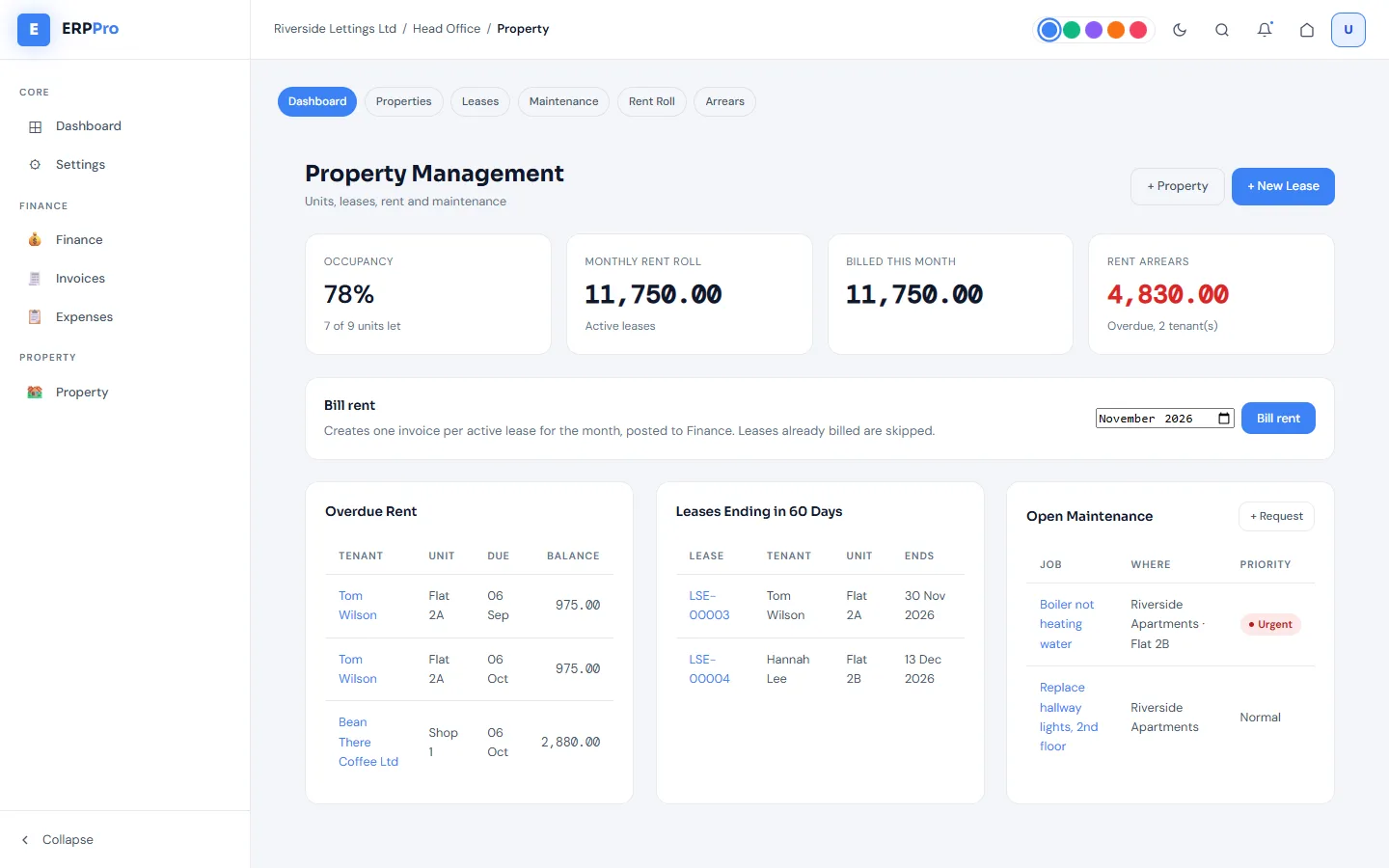
ERPPro Property, screen by screen
Real screens from the demo company every trial starts with. Click a thumbnail to see it larger.
What ERPPro Property does
Properties and units
Each building with its flats, shops or offices, asking rent and floor area, and which units are let or vacant.
Leases
Tenant, start and end dates or a rolling tenancy, monthly rent, billing day and payment terms. A unit can't be let twice for the same dates.
Rent billed in one click
One invoice per active lease for the month, posted to the books. Months already billed are skipped, so it can't double-charge.
Arrears
Overdue rent by tenant, oldest first, with days late. Record payments against the invoices and the balance updates.
Security deposits
Deposits received go to the bank and are held as a liability until refunded, so they never count as income.
Rent roll
Every unit with its tenant, rent, lease end, deposit held and unpaid rent, ready to print.
Maintenance
Repair requests per property or unit, with priority, contractor, cost and status.
Accounting
Double-entry books kept automatically: rental income, receivables, deposits and expenses, with profit & loss, balance sheet and VAT reports.
How to use ERPPro Property
The first day with the app, in 6 steps. We walk you through this live after deployment.
Set up your company
Log in as administrator, add your company and branches, and enter your VAT or tax ID in Settings if you charge VAT on commercial rent.
Add your properties and units
Under Property → Properties add each building, then its units with their asking rent.
Add your tenants
Add each tenant as a customer in Finance → Customers & Vendors, with their email and phone.
Create the leases
For each let unit create a lease with the rent, billing day, payment terms and deposit. Record the deposit when you receive it.
Bill rent every month
On the Property dashboard choose the month and click Bill rent: every active lease gets its invoice.
Collect and chase
Record payments on the invoices in Finance, and use the Arrears report to see who is behind.
ERPPro Property plans
One-time setup fee, no per-user fees. Maintenance is optional — 30 days are included free. Add managed hosting if you don't have a server.
Property
One company letting its own or managed property
Managed hosting (optional): +$59/month
- Properties, units, leases and rent
- Deposits, arrears and maintenance
- Invoicing, tax and accounting
- 1 company · up to 3 branches · 10 users
- Deployment + 1-hour walkthrough
- Maintenance includes 2 support hours a month
Property Plus
Larger portfolios and agencies
Managed hosting (optional): +$69/month
- Everything in Property
- Up to 2 companies · 6 branches · 25 users
- Import of properties, units and tenants from Excel
- Deployment + 2 training sessions
- Maintenance includes 3 support hours a month
Prices exclude your domain and, unless you add managed hosting, your server costs. How payment works: 50% to start, 50% on go-live, refundable before work starts. See the Terms & Conditions for what's included.
What you need to provide
Using your own server? Here's what it needs — ask us and we'll check it for free. With managed hosting we provide all of this.
- Linux VPS or cloud server (Ubuntu 22.04 or newer) where we can install Docker — at least 2 vCPU, 4 GB RAM and 40 GB SSD
- A domain or sub-domain (e.g. property.yourcompany.com) and access to its DNS settings
- SSH access for us during deployment — we agree a secure way to share it
- Ports 80 and 443 open for HTTPS (we set up the free SSL certificate)
Questions about ERPPro Property
Is there a limit on the number of properties or units?
Can tenants pay online?
Can I manage property for other owners?
Can you import our properties and tenants from Excel?
Can I add HR, purchasing or other ERPPro modules later?
Questions about ERPPro Property?
Send us a message or WhatsApp — we reply within one business day.